A fraudulent UPI collect request is one of the most common social engineering traps targeting digital payment users today.
Imagine you list something for sale online, an eager buyer contacts you almost instantly, ready to send an advance deposit. Seconds later, a payment notification on apps like GPay, PhonePe, etc. pops up on your phone with remark: “Refund / Credit ₹5,000”. The caller tells you to enter your UPI PIN so that the funds can be transferred in your account. You comply and loose all your money.
This is the reality of UPI collect request scams. According to the Indian Cyber Crime Coordination Centre (I4C), cyber fraud complaints in India have crossed millions annually, with tens of thousands of crores lost to digital financial scams.
🔔 Golden Rule: When you enter your UPI pin, money gets transferred from your account to the target account.
Key Takeaways
- Entering your UPI PIN always debits funds from your account and is never required to receive, verify, or claim a payment.
- Scammers manipulate the freeform “Note” or “Remark” field with words like “Refund” or “Credit” to disguise an outbound bill as an incoming deposit.
- Fraudsters rely on live phone calls and manufactured urgency so you approve the transaction before carefully reading the screen.
- Never scan a QR code or install screen-sharing applications (like AnyDesk) at the request of an unknown caller or unverified support agent.
- If you approve a fraudulent request, report it immediately to the 1930 helpline and freeze your banking channels within the two-hour “Golden Hour”.
What is Collect Request in UPI (and How It’s Supposed to Work)?
To understand how the UPI collect request scam works, first you need to understand why the National Payments Corporation of India (NPCI) built this feature.
The Unified Payments Interface (UPI) works on two operational transaction modules:
- Push Payments (Pay): You scan a merchant’s QR code, select a contact, or enter a Virtual Payment Address (VPA / UPI ID), specify an amount, and authenticate the transfer by entering your UPI pin. Here you are actively pushing funds outwards from your bank to recipient’s.
- Pull Payments (Collect Request): Here, an external individual or a merchant generates a digital payment invoice directed to your UPI ID. This action sends an actionable prompt to the UPI app like Google Pay or PhonePe or Paytm on your mobile, asking for your permission to pull a specific amount from your account. The transaction is not completed until you review and authorize it by entering your UPI pin.
Legitimate Use Cases of the UPI Collect Request
Now that you have understood how the UPI collect request scam works, you also need to see some of the legitimate and obvious use cases of this feature.
- Splitting shared expenses: A friend pays a restaurant bill and sends an ₹850 collect request directly to your UPI ID, saving you from manually typing out their account details, or scanning their UP ID.
- Desktop e-commerce checkouts: While buying something online from your laptop browser, you enter your UPI ID at checkout. The website sends a collect request request on your UPI app, allowing your to review the total amount. You can then pay the amount by entering your secret PIN.
- Scheduled recurring mandates: This is another legitimate use case of UPI collect requests. You use streaming services, pay mutual fund SIPs, and even pay utility bills like electricity and water charges. These service providers send pull requests to your UPI app, which you check & approve, and pay through the UPI app itself.
In every valid scenario, a collect request is an electronic demand asking you to authorize the transfer of money from your account. Its never a mechanism to receive, verify, or deposit money into your account.
💡 Pro Tip: Treat Collect Requests Like Restaurant Bills
When you go to a restaurant, you always double check the amount. Similarly, think of collect requests as a paper bill given to you at a restaurant. Handing over your card and entering your PIN never gives you cash. A digital UPI collect request works exactly the same way.
The Mechanics of a Fake UPI Collect Request: 4 Steps A Scammer Uses to Scam You
The UPI collect request scams do not work on a malware or brute force hacking or compromised banking servers. They are very simple scams in which you only, unknowingly, approve the transaction by entering your UPI pin.
This scam exploits the human cognitive biases through social engineering. Building strong online fraud awareness is the first step in dismantling these scams.
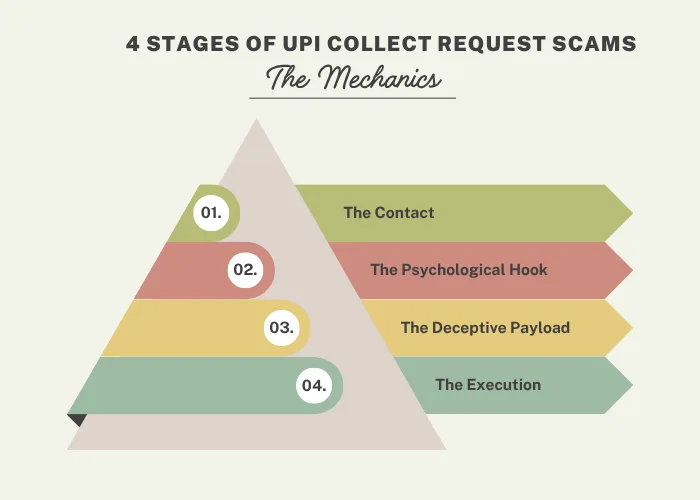
This scam is based on 4 deliberate stages:
- The Contact
- The Psychological Hook
- The Deceptive Payload
- The Execution
Now, let’s understand each of these stages in detail.
1. Contacting You on Open Platforms
The first step in the UPI collect request scam is being contacted by the scammers. They monitor online classifieds, local resale boards, freelance platforms, and more. They look for newly published ads by individuals and non-commercial sellers. Once they spot an ad, they reach out to the seller and insist on shifting the conversation to unmonitored channels like WhatsApp messages or direct mobile calls. This way they try to gain more control over the conversation.
2. Fabricating Trust and Urgency
In the next step, scammers adopt an authoritative and trustworthy persona. For instance, most commonly they portray themselves as an officer of the armed forces posted in active cantonment, or an administrative manager for a PSU, or an elderly buyer responding to your ad
They focus on removing the room for negotiation by accepting the listed asking price and demanding to send an advance payment immediately. To justify such strange payment steps later, they claim that since they are from the defence forces or from a PSU, their account requires a “dual-handshake verification” before transferring the funds.
3. Manipulating the Remark Field
Fraudsters open their payment applications, click on “Request Money”, enter your VPA, and input the agreed amount.
They take advantage of the freeform “Add a Note” or “Remark” text box. Since the UPI apps display this field prominently, scammers type misleading authoritative text like:
- Payment Received: INR 15,000
- Auto-Credit Refund Gateway
- Verification Authorization Token: Rs. 9,999
- Govt_Defense_Disbursement_Credit
When you get a notification on your phone from the UPI app, the interface shows the requested amount with words like “Credit” or “Refund”, creating an illusion of an incoming deposit.
4. Forcing PIN Entry on a Live Call
The last stage of this scam is when the scammers get on a live call with you and ask you to enter your UPI pin.
A collect request is harmless until you authorize it. To make sure you do not verify whatever is on your screen, the fraudster stays on a live phone call with you, applying constant verbal pressure:
- Check your screen now; the verification token expires in 60 seconds
- Tap the Accept button to link our banking gateway
- Enter your UPI pin to complete the clearence into your account
When you are put under so much pressure, you might ignore the warning signs and enter your UPI pin.
💡 Pro Tip: Beware of the ₹5 “Double-Cross” Trick
These scammers often send a genuine ₹5 push payment first to build trust with you. When you confirm the credit ₹5, they send a collect request of the remaining balance. Always evaluate each message individually, never assume the second notification works like the first.
3 Common Scenarios of UPI Collect Request Scam
The Reserve Bank of India (RBI) regularly publishes consumer advisories which highlight three recurring operational blueprints used by scammers for UPI collect requests.
Let’s understand them below.
1. The Eager Marketplace Buyer
You get a call from a scammer immediately after you post a listing selling something. The fraudster offers to buy the product and promises to arrange its pickup later. Instead of sending a P2P payment, they send a collect request marked as “Advance for XYZ Product”. You believe the notification thinking it represents an incoming deposit receipt. You enter your PIN thinking you will get the money, but instead you end up losing your money.
2. The Distressed “Accidental Transfer” Caller
You receive an unexpected call from an emotional stranger claiming they have made a typo error while trying to pay someone else urgently, sending you ₹15,000 by mistake. Before you can check your transaction history, you immediately get a pop up notification of the same amount with note “Refund of Wrong Transfer”. In good faith, you authorize the collect request, and inadvertently end up sending your own money to the scammer.
3. The Impersonated Support Executive
Imaging you voice your dissatisfaction against delayed food deliveries, or failed airline bookings, or stuck merchant refunds, etc. frequently on social media. Fraudsters regularly monitor keywords related to such posts and contact you via fake helpdesk profiles. They claim that an automated system failed and that’s why you faced such an issue. They then send a collect request labelled as “Refund Token” or “Reversal Clearance” and ask you enter your UPI pin. Once you enter your secret PIN, you lose whatever amount the collect request was sent for.
Red Flags: Warning Signs of a UPI Collect Request Scam
Every iteration of this scam carries similar, easily noticeable technical and behavioral indicators:
- Instructions to enter PIN to receive money: This is impossible under the UPI system architecture. Receiving money is an entirely passive event.
- Manipulative notes in the transaction description: Notes containing phrases like “Claim Cashback”, “Payment Receieved”, or “Verification Approval” are manually typed by the external sender and not generated by your bank.
- Unfamiliar or personal VPAs: Legitimate corporate platforms route transactions through formal merchant VPAs like @icici, @hdfcbank, or @paytm etc. Scammers tend to use disposable individual handles such as merchantdesk_8472@axl or personal phone numbers.
- Insistence on saying on the call: Scammers talk quickly and discourage you from hanging up to verify the payment because they know even a 30-second pause can give you enough time to read the interface quickly.
- Demands to install remote desktop software: This is another classic ref flag you should be on the lookout for. If someone unknown or unexpected asks you to install software like AnyDesk, TeamViewer, etc. terminate the contact immediately. With these applications, the scammer can monitor your screen and capture any two-factor authentication codes.
How to Protect Your Account: Practical Defence
The key to protecting your finances is to keep consistent digital hygiene across all your devices. When you observe anything suspicious, knowing how and when to report cyber crime proactively keeps community payment networks cleaner and safer.
| Action Screen Element | What it Means | Correct Response |
| Enter your 4/6 digit PIN | Funds will be debited | Stop immediately and close the application |
| Approve/Decline | An inbound debit invoice | Tap “Decline if unsolicitated |
Immediate Action Plan: What to do If You Approved a Fraudulent UPI Collect Request
If you realize that you have approved a fraud collect request, act immediately.
Inter-bank intervention during the first two hours substantially improves the likelihood of freezing the stolen funds before they are withdrawn at an ATM or converted into digital assets. This two-hour window is widely recognized as the “Golden Hour”.
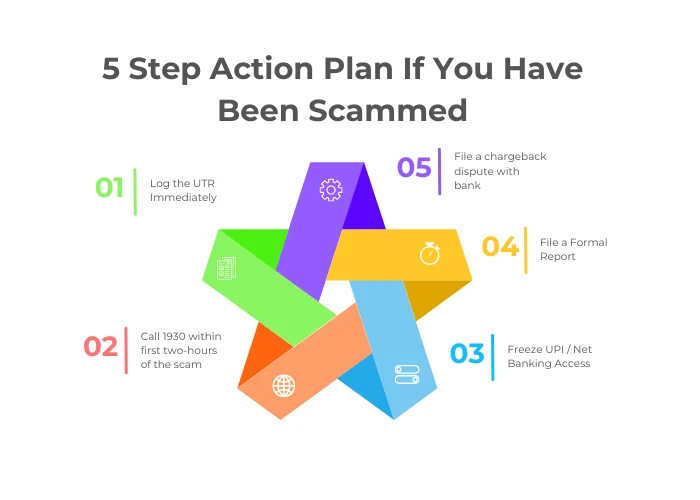
There are 5 steps that you need to carry out:
1. Log the UTR immediately
Open your payment app, locate the fraudulent debit in your transaction history, and record the 12-digit UPI transaction ID / UTR (Unique Transaction Reference). This number is very important for tracing the movement of funds across intermediate accounts.
2. Call 1930 cyber fraud helpline number within two-hours
Dial the official cyber crime helpline number at 1930 immediately. The Citizen Financial Cyber Fraud Reporting and Management System (CFCFRMS), managed by I4C, operates an integrated communications channel with major retail banks.
Provide the bank’s executive with your account details, the scammer’s VPA or phone number, the transaction amount, and the 12-digit UTR. This allows the beneficiary banks to place an emergency lien on the recipient’s account, preventing withdrawal.
3. Freeze UPI / net banking access through your bank
The next step is to get in touch with your bank to freeze UPI and/or net banking access. Do not solely rely on automated support tickets inside the payment apps.
Instead:
- Call your bank’s 24/7 emergency fraud helpline number
- Request an immediate freeze on your UPI services and digital banking channels to block subsequent unauthorized debits
- Register a formal unauthorized transaction dispute citing the UTR number.
4. Lodge a formal report
Visit the National Cyber Crime Reporting Portal at cybercrime.gov.in and submit a formal complaint under the Financial Fraid section. Upload your transaction screenshots, call logs the scammer’s contact number, your bank statement, and any other such details.
Remember to save the acknowledgment number the portal gives you.
5. File a written chargeback dispute with your bank branch
Visit your bank’s branch with 24 to 48 hours. Submit a formal dispute letter addressed to the Branch Manager detailing the incident, accompanied by your cybercrime acknowledgment number and account statement. This document triggers the formal chargeback and reconciliation process mandated by the RBI.
💡 Pro Tip: Document the Exact Timestamps
Record the exact minute the transaction took place and the exact minute you dialed 1930. This will demonstrate that you alerted the authorities on time and will increase the likelihood of tracing the money and even help in its recovery.
The One Rule That Stops Every UPI Collect Request Scam
Scammers will continue to adapt their scripts, invent new personas, and exploit emerging social events. However, regardless of the narrative they construct, every collect request scam depends on a single user action: pressing the button that authorizes a debit.
You can completely neutralize every variation of this scam by remembering one fundamental principle:
Your UPI PIN is exclusively used to SEND money. You NEVER need to enter a PIN to receive, verify, deposit, or claim money.
If someone on the phone claims you must enter a PIN to receive payment, they are attempting to defraud you. If an application prompt asks for your PIN to process a refund, it is an attack. The moment you see a PIN prompt while expecting money to arrive, step away from your screen, disconnect the call, and decline the request.
Your PIN is the key to your bank account. Never enter it unless you explicitly intend to send your money away.
FAQs: UPI Collect Request
Q1. Do I ever need to enter my UPI PIN to receive money?
No. Receiving money through UPI is entirely passive and requires no PIN, password, or biometric authorization. The moment a screen prompts you for your 4- or 6-digit UPI PIN, you are authorizing an outward debit from your account.
Q2. What is the difference between “Pay” and “Collect” in UPI apps?
A “Pay” (push) transaction is initiated by you to send money to someone else. A “Collect” (pull) request is an electronic invoice sent to you by another person or merchant requesting that you transfer money to them. Approving a collect request pays the requester.
Q3. Can a scammer steal money if I only open or view a UPI collect request?
No. Simply viewing or receiving a collect request cannot debit your account. Funds can only leave your bank if you tap “Approve” or “Pay” and successfully authenticate the transaction with your secret UPI PIN. If you see an unsolicited request, tap “Decline” and mark it as spam.
Q4. Can I get my money back if I accidentally approved a fraudulent collect request?
Recovery is possible if you act quickly. Calling the national cyber fraud helpline at 1930 within the first two hours enables authorities to issue real-time freeze instructions to the recipient’s bank before the funds are withdrawn. You must also file a dispute with your bank’s fraud desk and lodge an official complaint on the national cyber crime reporting portal.
Q5. Why do scammers ask to send ₹1 or ₹5 first before sending a collect request?
This is known as the “double-cross” technique. Scammers send a genuine small deposit via a standard push transfer to build credibility. Once they have gained your trust and confirmed you received the money, they send a large collect request, banking on the assumption that you will expect another incoming credit instead of a debit.
About the author
Rishabh Dev Choudhary writes and edits The Digital Big Brother. He isn’t a security engineer and doesn’t pretend to be — his work is reading government advisories, police notices, and reader reports, then rewriting them in language a nineteen-year-old will actually finish. Every scam example on this site is a reconstruction built from reported cases, and is labelled as one. More about the author →