What it looks like
One character is all it takes
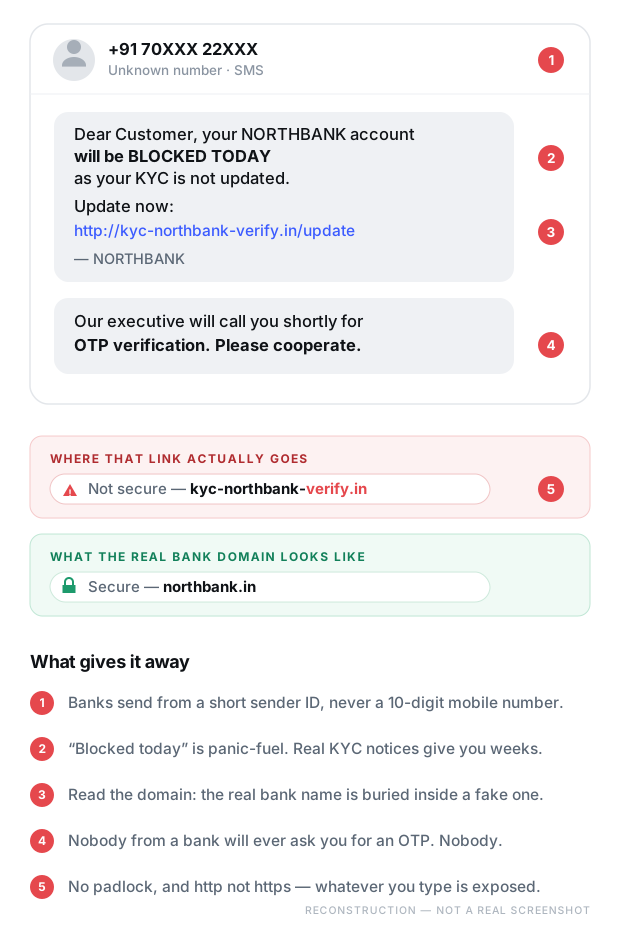
The message and the website are both copies. What separates the real bank from the fake one is a handful of characters in the address bar — which is exactly the part nobody reads under pressure.
The one-line version
Nobody from a bank, a wallet, or any company will ever ask you for an OTP. There are no exceptions to this.
Step by step
How it actually works
This scam has two halves. The link steals what it can, and the phone call takes the rest.
01
The threat arrives
Your account will be blocked today. Your KYC has expired. Your card is deactivated. The deadline is always immediate, because a real deadline weeks away gives you time to check.
02
The lookalike page
The link opens a page that copies your bank’s design closely. The address is built to read correctly at a glance: the bank’s name is in there, just not in the part that matters.
03
You hand over the keys
Customer ID, net banking password, card number, expiry, CVV. From the moment you type them, someone else has them — usually within seconds, and often while you are still on the page.
04
The call comes
Someone phones sounding calm and official, often quoting details you just entered, which makes them sound legitimate. They are calling because they need one last thing.
05
The OTP
An OTP is the final lock on your account. They cannot move money without it, which is why the entire call exists to get you to say six digits out loud. Reading it out is the moment the money goes.
Red flags
If you see any of these, stop
You don’t need all of them. One is enough to walk away.
Anyone asking for an OTP. Bank staff, wallet support, delivery agents, “verification teams” — none of them ever need it.
A bank message from a 10-digit mobile number. Banks send from short alphabetic sender IDs, not personal numbers.
“Blocked today” urgency. Real KYC notices give you weeks and appear inside your banking app too.
A link in the message at all. Open your banking app directly instead — if the notice is real, it will be in there.
http instead of https, or no padlock. Anything you type is exposed.
A page asking for your net banking password and card CVV together. Your bank already knows who you are; it never needs both.
A skill worth having
How to read a web address properly
This takes two minutes to learn and protects you against a whole category of scams for the rest of your life.
Find the first single slash in the address. Everything after it is decoration and can say anything.
Now look at the text just before that slash, and read the last two parts of it. That is who actually owns the site.
northbank.in/kyc/update — owner is northbank.in. Real.
kyc-northbank-verify.in — owner is northbank-verify.in. A different site that put the bank’s name in its own name.
northbank.in.secure-login.com — owner is secure-login.com. Not the bank at all.
Government sites end in .gov.in and nothing else. Not .co.in, not .org.in, not .gov.co.in.
If it already happened
You clicked, or you gave the OTP
Every minute counts, but the steps are simple and you can do them from your phone right now.
Do this first
Block your card through your banking app or the bank’s official number, change your net banking password from a different device, and report the transaction to the bank. Then call 1930 and file at cybercrime.gov.in. If you entered details on the fake page, assume everything you typed is compromised and change it everywhere you reused it.
Keep going
Related scams
UPI collect request fraud
A “refund” that quietly sends your money the other way.
Fake scholarship & result sites
A lookalike government portal after your Aadhaar and a fee.
“Digital arrest” calls
Fake police on video, telling you not to hang up.