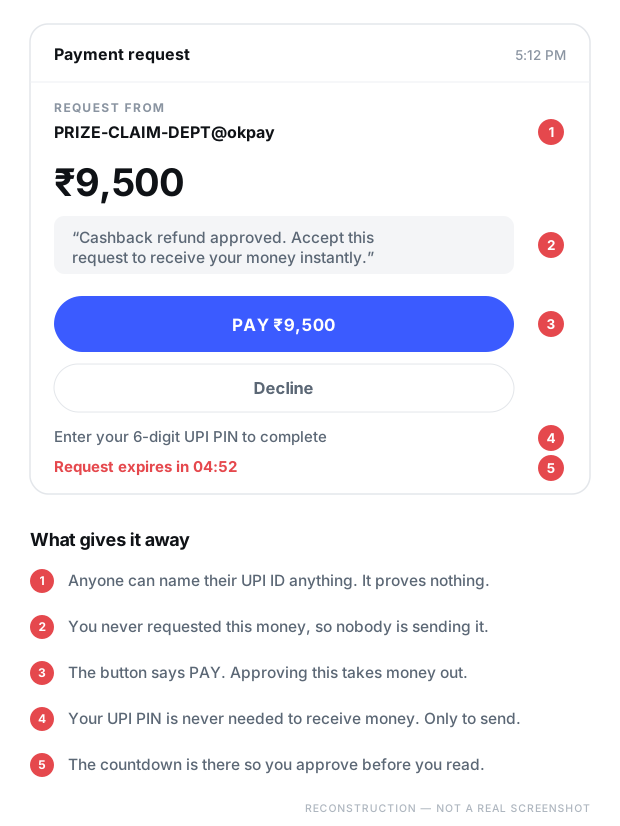
Somebody sends you money. Except they don’t — they send you a request for money, dressed up as a refund. The entire scam rests on one misunderstanding about how UPI works.
What it looks like
Read the button, not the note
The note attached to a UPI request is free text. The scammer writes it. It can say “refund approved”, “cashback”, or anything else. The button underneath it is the only part that tells you the truth.
The one-line version
You never need your UPI PIN to receive money. Entering it only ever sends money out.
Step by step
How it actually works
This one takes seconds rather than days, which is exactly why it works. There is no relationship to build — just one moment of misreading.
01
A reason to expect money
A cancelled order refund. A cashback. A prize. A buyer on a marketplace app who wants to pay you for something you listed. Sometimes it is “I transferred to your number by mistake, please return it” — and no money ever arrived.
02
The collect request lands
Your UPI app shows an amount and a note. Both were written by the person sending it. The note is the story; the amount is what you are about to lose.
03
The misread
Under mild time pressure almost everyone reads the note and not the button. The screen says PAY. The note says refund. The note wins.
04
The PIN does its only job
A UPI PIN authorises money leaving your account. That is the entire function. There is no version of UPI where a PIN is needed to receive.
05
“It failed, try again”
They send a second request, and a third, claiming the first did not go through. Each approval is another debit. Some people lose the same amount four times in two minutes.
Red flags
If you see any of these, stop
You don’t need all of them. One is enough to walk away.
Anyone asking you to enter your UPI PIN “to receive” money. This is the whole scam in one sentence.
Money you never asked for. Unexpected refunds, cashbacks and prizes are the standard cover story.
A QR code sent to you “so you can receive payment”. Scanning a QR code pays money out. It never brings money in.
A buyer who insists on sending a collect request instead of simply transferring to your UPI ID.
A note that contradicts the button. If the note says refund and the button says PAY, the button is correct.
A countdown on the request. It exists so you approve before you read.
The rule that ends it
How receiving money actually works
Commit this to memory and this scam becomes impossible to fall for.
To receive money you share your UPI ID, or you show your QR code. That is all you ever do.
You never approve anything to receive money.
You never enter a PIN to receive money.
You never scan a QR code to receive money — scanning pays out.
If a screen asks for your PIN, money is about to leave your account. Read the amount before you touch it.
Turn on transaction alerts so every debit shows up immediately, not at the end of the month.
If it already happened
You approved it. Move fast.
Speed matters more here than with any other scam on this site. Money sent over UPI lands instantly, but it also leaves a clear trail, and a beneficiary account that is reported quickly can sometimes be frozen before the money is moved on.
Do this first
Call your bank’s official number and report the transaction immediately, then call 1930. Have the UPI transaction ID (the UTR number) from your app ready — it is the single most useful piece of information you can give them. Then file at cybercrime.gov.in.